English
- http://wiki.kldp.org/wiki.php/AndroidPortingOnRealTarget
Korean
- http://wiki.kldp.org/wiki.php/AndroidPortingOnRealTarget/ko
아래 문서는 위의 번역 문을 퍼온 글임을 밝힌다.
Android Porting On Real Target/ko
Contents
![[-]](http://wiki.kldp.org/imgs/plugin/arrup.png "[-]")
![[+]](http://wiki.kldp.org/imgs/plugin/arrdown.png "[+]")
1 Introduction
2 Copyright and Acknowledgements
3 안드로이드 아키텍처의 요약 분석
3.1 안드로이드 커널
3.1.1 ARM EABI
3.1.2 OpenBinder
3.1.3 프레임 버퍼
3.1.4 입력 장치
3.1.5 Low Memory Killer
3.1.6 안드로이드 로거(Android Logger)
3.1.7 안드로이드 파워(Android power)
3.1.8 Panic Timeout
3.2 안드로이드 루트 파일 시스템
3.3 안드로이드 패키지의 라이센스
4 ARM EABI를 지원하는 툴체인
4.1 툴체인 빌드하기
4.2 다른 툴체인
5 커널
5.1 커널 패치
5.2 .config
6 루트 파일 시스템
6.1 에뮬레이터에서 램디스크 이미지 얻기
6.2 에뮬레이터에서 data와 system 디렉토리 얻기
6.3 존재하는 램디스크 이미지로 안드로이드 시스템을 통합하기
6.4 System 과 data 디렉토리
6.5 실행과 디버그
6.6 스크린샷
7 애플리케이션 개발
7.1 이클립스(Eclipse) 통합개발환경(IDE) 설치하기
7.2 샘플 애플리케이션을 빌드하고 실행하기
7.3 스크린샷
8 에필로그
9 링크와 참조
1 Introduction
2 Copyright and Acknowledgements
.png ":)") 원문 : http://wiki.kldp.org/wiki.php/AndroidPortingOnRealTarget
원문 : http://wiki.kldp.org/wiki.php/AndroidPortingOnRealTarget 3 안드로이드 아키텍처의 요약 분석
3.1 안드로이드 커널
3.1.1 ARM EABI
- FPU를 쓰거나 쓰지 않는, 빠른 실수 연산(floating point) 성능
- soft 와 hardfloat 코드의 혼용 가능
- 이전에 사용되어지던 것과 같이 구조체 팩킹(packing)이 고통스럽지 않습니다.
- 다른 툴들과의 더 나은 호환성(compatibility)
- 더 효율적인 syscall 관례(convention). (http://www.arm.linux.org.uk/developer/patches/viewpatch.php?id=3105/4)
long ftruncate64(unsigned int fd, loff_t length); 의 예:

기존 ABI:
- put fd into r0 (fd를 r0로 넣음)
- put length into r1-r2 (길이를 r1-r2로 넣음)
- 커널 호출을 위해서 "swi #(0x900000 + 194)" 사용.

새로운 ARM EABI:
- put fd into r0 (fd를 r0로 넣음)
- put length into r2-r3 (skipping over r1) (길이를 r2-r3로 넣음. r1은 무시)
- put 194 into r7 (194를 r7로 넣음)
- use "swi 0" to call the kernel (커널을 호출하기 위해서 "swi 0" 사용)
- 기존 ABI
$ arm-softfloat-linux-gnu-objdump -x t7-demo | grep private
private flags = 202: [APCS-32] [FPA float format] [software FP] [has entry point]

$ file t7-demo
t7-demo: ELF 32-bit LSB executable, ARM, version 1 (ARM),
for GNU/Linux 2.4.3, dynamically linked (uses shared libs),
for GNU/Linux 2.4.3, stripped
- ARM EABI
$ arm-softfloat-linux-gnueabi-objdump -x t7-demo  | grep private
private flags = 4000002: [Version4 EABI] [has entry point]

$ file t7-demo
t7-demo: ELF 32-bit LSB executable, ARM, version 1 (SYSV),
for GNU/Linux 2.6.14, dynamically linked (uses shared libs),
for GNU/Linux 2.6.14, stripped
![[https]](http://wiki.kldp.org/imgs/https.png)
3.1.2 OpenBinder
- Dianne Hackborn worked for the BeOS explains briefly at osnews.com.
http://osnews.com/story/13674/Introduction-to-OpenBinder-and-Interview-with-Dianne-Hackborn/
- Documentation
http://www.angryredplanet.com/~hackbod/openbinder/docs/html/index.html
- Source code
http://www.angryredplanet.com/~hackbod/openbinder/openbinder-12-28-2005.tar.gz
3.1.3 프레임 버퍼
- 프레임 버퍼 정보 초기화
struct fb_info *fbinfo;
...
fbinfo->fix.ypanstep	= 1;
fbinfo->var.yres_virtual    = gm->lcd.yres * 2;
fbinfo->fix.smem_len        =	(gm->lcd.xres *
                                gm->lcd.yres *
                                gm->lcd.bpp / 8) * 2;
- 프레임 버퍼 메모리 할당
struct mvfb_info *fbi;
...
fbi->map_size = PAGE_ALIGN(fbi->fb->fix.smem_len + PAGE_SIZE);
fbi->map_cpu  = dma_alloc_writecombine(fbi->dev, fbi->map_size,
                                       &fbi->map_dma, GFP_KERNEL);
- fb_pan_display 함수 후킹 구현
static int mvfb_pan_display(struct fb_var_screeninfo *var, struct fb_info *fb)
{
...
}

static struct fb_ops mvfb_ops = {
        .owner		= THIS_MODULE,

        .fb_check_var	= mvfb_check_var,
        .fb_set_par	= mvfb_set_par,
        .fb_setcolreg	= mvfb_setcolreg,
        .fb_blank	= mvfb_blank,
        .fb_pan_display = mvfb_pan_display,

        .fb_fillrect	= cfb_fillrect,
        .fb_copyarea	= cfb_copyarea,
        .fb_imageblit	= cfb_imageblit,

        .fb_mmap	= mvfb_mmap,
};
3.1.4 입력 장치
$ adb shell

# cat /proc/bus/input/devices
I: Bus=0000 Vendor=0000 Product=0000 Version=0000
N: Name="goldfish-events-keyboard"
P: Phys=
S: Sysfs=/class/inut/input0
U: Uniq=
H: Handlers=kbd mouse0 event0
...
#
# cat /proc/bus/input/handlers
N: Number=0 Name=kbd
N: Number=1 Name=mousedev Minor=32
N: Number=2 Name=evdev Minor=64
#
- 키패드
struct input_event {
        struct timeval time;
        unsigned short type;
        unsigned short code;
        unsigned int value;
};/* * Key Layout Scancode Table * * 1 2 3 0x1 0x10 0x100 * 4 5 6 0x2 0x20 0x200 * 7 8 9 0x4 0x40 0x400 * * 0 # 0x8 0x80 0x800 */ static unsigned short android_keycode[] = { /* * 0x66 0x67 0x9e Home Up Back * 0x69 0xe8 0x6a Left Ok Right * 0xe7 0x6c 0x6b Send Down Hangup * 0xe5 Menu just_distinction_for_private */ KEY_HOME, KEY_UP, KEY_BACK, KEY_LEFT, KEY_REPLY, KEY_RIGHT, KEY_SEND, KEY_DOWN, KEY_END, KEY_KBDILLUMDOWN, KEY_RESERVED, KEY_PLAY };
...
keycode = translate_keycode(scancode);
...
input_event(keydev->input, EV_KEY, keycode, KEY_PRESSED);
or
input_event(keydev->input, EV_KEY, keycode, KEY_RELEASED);
...
- 터치 스크린
# cat /proc/bus/input/devices
I: Bus=0000 Vendor=0000 Product=0000 Version=0000
N: Name="MVT7 KEYPAD"
P: Phys=
S: Sysfs=/class/input/input0
U: Uniq=
H: Handlers=kbd event0 evbug
B: EV=f
...

I: Bus=0000 Vendor=0000 Product=0000 Version=0000
N: Name="TSC2007 Touchscreen"
P: Phys=0-0090/input0
S: Sysfs=/class/input/input1
U: Uniq=
H: Handlers=event1 evbug
B: EV=b
B: KEY=400 0 0 0 0 0 0 0 0 0 0
B: ABS=1000003

# cat /proc/bus/input/handlers
N: Number=0 Name=kbd
N: Number=1 Name=evdev Minor=64
N: Number=2 Name=evbug
3.1.5 Low Memory Killer
3.1.6 안드로이드 로거(Android Logger)
3.1.7 안드로이드 파워(Android power)
3.1.8 Panic Timeout
3.2 안드로이드 루트 파일 시스템
- ramdisk.img
- system.img
- userdata.img
...
zygote {
    exec /system/bin/app_process
    args {
        0 -Xzygote
        1 /system/bin
        2 --zygote
    }
    autostart 1
}
runtime {
    exec /system/bin/runtime
    autostart 1
}
...
dbus {
    exec /system/bin/dbus-daemon
    args.0 --system
    args.1 --nofork
    autostart 1
}
...
3.3 안드로이드 패키지의 라이센스
| Open Source | License |
| Linux Kernel | GPL |
| NetBSD C Library | BSD |
| DBUS | GPL2 |
| OpenBinder (core) | GPL2 |
| YAFFS2 | GPL |
| SQLite | GPL2 |
| Webkit | BSD (including LGPL) |
| WebCore | LGPL |
| SDL | LGPL |
| SGL | Google(Skia) |
| OpenGL | SGI OpenGL (BSD/MPL) |
4 ARM EABI를 지원하는 툴체인
4.1 툴체인 빌드하기
$./arm-softfloat-eabi.sh
4.2 다른 툴체인
5 커널
5.1 커널 패치
5.2 .config
- 필수적인 부분
...
CONFIG_PANIC_TIMEOUT=0
CONFIG_AEABI=y
CONFIG_OABI_COMPAT=y
CONFIG_BINDER=y
CONFIG_LOW_MEMORY_KILLER=y
...
- 필요에 따른 부분
...
# CONFIG_ANDROID_GADGET is not set
# CONFIG_ANDROID_RAM_CONSOLE is not set
# CONFIG_ANDROID_POWER is not set
# CONFIG_ANDROID_LOGGER is not set
...
6 루트 파일 시스템
6.1 에뮬레이터에서 램디스크 이미지 얻기
$ gzip -cd ramdisk.img > ramdisk
$ cpio -iv -F ramdisk
data
dev
etc
etc/default.prop
etc/firmware
etc/firmware/brf6150.bin
etc/firmware/brf6300.bin
etc/hcid.conf
etc/hosts
etc/init.gprs-pppd
etc/init.rc
etc/init.ril
etc/init.testmenu
etc/ppp
etc/ppp/chap-secrets
etc/ppp/ip-down
etc/ppp/ip-up
etc/qemu-init.sh
etc/system.conf
etc/system.d
etc/system.d/bluez-hcid.conf
etc/usbd.conf
init
proc
sbin
sbin/recovery
sys
system
tmp
var
var/run
6.2 에뮬레이터에서 data와 system 디렉토리 얻기
# adb push busybox .
# adb shell
# chmod +x /busybox
# busybox tar -c /data.tar /data
# busybox tar -c /system.tar /system
# exit
# adb pull /data.tar .
# adb pull /system.tar .
6.3 존재하는 램디스크 이미지로 안드로이드 시스템을 통합하기
...
startup {
        ...
#       qemu-init {
#           exec /etc/qemu-init.sh
#       }
}
...
#!/bin/sh
mount -t yaffs /dev/block/mtdblock5 /mnt
mount --bind /mnt/data   /data
mount --bind /mnt/system /system

# data folder is owned by system user on emulator. Fix 777 to other.
chmod 777 /data
#chmod 777 /system

export PATH=/system/sbin:/system/bin:/sbin/usr/local/bin
export LD_LIBRARY_PATH=/system/lib

export ANDROID_BOOTLOGO=1
export ANDROID_ROOT=/system
export ANDROID_ASSETS=/system/app
export EXTERNAL_STORAGE=/sdcard
export ANDROID_DATA=/data
export DRM_CONTENT=/data/drm/content

/init &
...
export TSLIB_CONSOLEDEVICE=none
export TSLIB_FBDEVICE=/dev/fb0
export TSLIB_TSDEVICE=/dev/input/event1
export TSLIB_CALIBFILE=/etc/pointercal
export TSLIB_CONFFILE=/etc/ts.conf
export TSLIB_PLUGINDIR=/lib/ts

export LD_PRELOAD=/lib/libts.so:/lib/ts/pthres.so
...
6.4 System 과 data 디렉토리
6.5 실행과 디버그
# cd /
# . /android/run.sh
yaffs: dev is 32505861 name is "mtdblock5"
yaffs: passed flags ""
yaffs: Attempting MTD mount on 31.5, "mtdblock5"
yaffs: auto selecting yaffs2
# init: HOW ARE YOU GENTLEMEN
init: reading config file
init: device init
init: mtd partition -1,
init: mtd partition 0, "l1boot"
init: mtd partition 1, "u-boot"
init: mtd partition 2, "params"
init: mtd partition 3, "kernel"
init: mtd partition 4, "ramdisk"
init: mtd partition 5, "rootfs"
sh: can't access tty; job control turned off
# binder_open(c394bcc8 c3c731a0) (pid 1577) got c3e48000
binder_open(c394bcc8 c3cd8dc0) (pid 1616) got c319f000
binder_open(c394bcc8 c3cd8ac0) (pid 1673) got c3d10000
binder_open(c394bcc8 c3cd8940) (pid 1680) got c0e19000
binder_open(c394bcc8 c3cd88c0) (pid 1691) got c2fa0000
binder_open(c394bcc8 c3d174a0) (pid 1592) got c25b8000
binder_release(c394bcc8 c3cd88c0) (pid 1691) pd c2fa0000
#
- /dev 상에 eac 디바이스 파일을 만들지 마세요. 그 것은 qemu상의 오디오를 위한 것입니다. 만약 있다면 시작 절차(start up sequence)는 사운드 디바이스에 어떤 데이터를 쓰는 것을 끝마치기 위해서 영원히 기다릴 것입니다.
- 수동 시작(manual startup) 대신에 안드로이드 init 바이너리를 사용하세요. 수동 시작은 안드로이드 패치가 필요합니다. 그 경우 시작 절차는 /sys/android_power/acquire_partial_wake_lock에 접근하고 기다릴 것입니다.
#!/bin/sh
# set environment variables above example
...
/system/bin/app_process -Xzygote /system/bin --zygote &
/system/bin/dbus-daemon --system &
/system/bin/runtime
./strace -ff -F -tt -s 200 -o /tmp/strace runtime
6.6 스크린샷
recvfrom(4, "add@/devices/virtual/misc/networ"..., 1024, 0, NULL, NULL) = 144
mknod("/dev/network_latency", S_IFCHR|0600, makedev(10, 58)) = 0
chown32("/dev/network_latency", 0, 0)   = 0
recvfrom(4, 0xbee2b72a, 1024, 0, 0, 0)  = -1 EAGAIN (invain)
getdents64(8, /* 5 entries */, 4200)    = 136
getdents64(8, /* 0 entries */, 4200)    = 0
close(8)                                = 0
SYS_305(0x7, 0x27f3b, 0x24000, 0, 0x28e98) = 8
SYS_305(0x8, 0x1b6ec, 0x20001, 0, 0x28e98) = 9
write(9, "add\n", 4)                    = 4
close(9)                                = 0
recvfrom(4, "add@/devices/virtual/misc/networ"..., 1024, 0, NULL, NULL) = 150
mknod("/dev/network_throughput", S_IFCHR|0600, makedev(10, 57)) = 0
chown32("/dev/network_throughput", 0, 0) = 0
recvfrom(4, 0xbee2b72a, 1024, 0, 0, 0)  = -1 EAGAIN (Resource temporarily unavailable)
getdents64(8, /* 5 entries */, 4200)    = 136
getdents64(8, /* 0 entries */, 4200)    = 0
close(8)                                = 0
getdents64(7, /* 0 entries */, 4200)    = 0
close(7)                                = 0
SYS_305(0x6, 0x26f13, 0x24000, 0, 0x27e18) = 7
SYS_305(0x7, 0x1b6ec, 0x20001, 0, 0x27e18) = -1 ENOENT (No such file or directory)
getdents64(7, /* 3 entries */, 4200)    = 80
SYS_305(0x7, 0x27e6b, 0x24000, 0, 0xffffffff) = 8
SYS_305(0x8, 0x1b6ec, 0x20001, 0, 0x28e98) = 9
write(9, "add\n", 4)                    = 4
close(9)                                = 0
recvfrom(4, "add@/devices/virtual/sound/timer"..., 1024, 0, NULL, NULL) = 128
mknod("/dev/timer", S_IFCHR|0600, makedev(116, 33)) = 0
chown32("/dev/timer", 0, 0)             = 0
recvfrom(4, 0xbee2b72a, 1024, 0, 0, 0)  = -1 EAGAIN (Resource temporarily unavailable)
getdents64(8, /* 5 entries */, 4200)    = 136
getdents64(8, /* 0 entries */, 4200)    = 0
close(8)                                = 0
getdents64(7, /* 0 entries */, 4200)    = 0
close(7)                                = 0
getdents64(6, /* 0 entries */, 4200)    = 0
close(6)                                = 0
getdents64(5, /* 0 entries */, 4200)    = 0
close(5)                                = 0
7 애플리케이션 개발
- AndroidManifest.xml
- classes.dex
- resources.arsc
- res 디렉토리
7.1 이클립스(Eclipse) 통합개발환경(IDE) 설치하기
7.2 샘플 애플리케이션을 빌드하고 실행하기
7.3 스크린샷
- 노키아의 N810 제품(arm1136jf-s) 상의 안드로이드 플랫폼
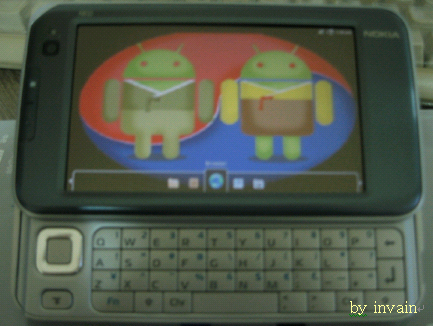
- Android Platform on arm1136jf-S for another CE Product.
8 에필로그
9 링크와 참조
- 안드로이드 메인 페이지 : http://code.google.com/android/
- 데비안(Debian) ARM EABI 위키 : http://wiki.debian.org/ArmEabiPort
- 시스템 콜 규약 : http://www.arm.linux.org.uk/developer/patches/viewpatch.php?id=3105/4
- Codesourcery의 FAQ : https://support.codesourcery.com/GNUToolchain/kbentry32
- OpenBinder를 위한 Dianne Hackborn 인터뷰 : http://osnews.com/story/13674/Introduction-to-OpenBinder-and-Interview-with-Dianne-Hackborn/
- OpenBinder 문서 : http://www.angryredplanet.com/~hackbod/openbinder/docs/html/index.html
- OpenBinder 소스 코드 : http://www.angryredplanet.com/~hackbod/openbinder/openbinder-12-28-2005.tar.gz
- Crosstool : http://www.kegel.com/crosstol/
- Crosstool EABI 패치 : http://sources.redhat.com/ml/crossgcc/2006-12/msg00076.html
- Codesourcery : http://www.codesourcery.com
- Benno의 블로그 : http://benno.id.au
- Android 패치 : http://benno.id.au/blog/2007/11/21/android-neo1973
- Static Busybox : http://benno.id.au/blog/2007/11/14/android-busybox
- Static Strace : http://benno.id.au/blog/2007/11/18/android-runtime-strace
- Dex 파일 형식 : http://www.retrodev.com/android/dexformat.html
- Android SDK 설치 : http://code.google.com/android/intro/installing.html
- Eclipse IDE : http://www.eclipse.org/downloads/
- JDK SE : http://java.sun.com/javase/downloads/index.jsp
- 2008 Korea Android Summit의 발표


댓글 없음:
댓글 쓰기